AI Product Manager for regulated teams

Your AI Product Manager.Runs where your data lives.

Turn interviews, support tickets and NPS feedback into evidence-linked PRDs and dev tickets. Run it on your device, your servers or inside your IT setup.
Solo · your deviceTeam · your serversEnterprise · your IT

Your evidence. Your workspace.

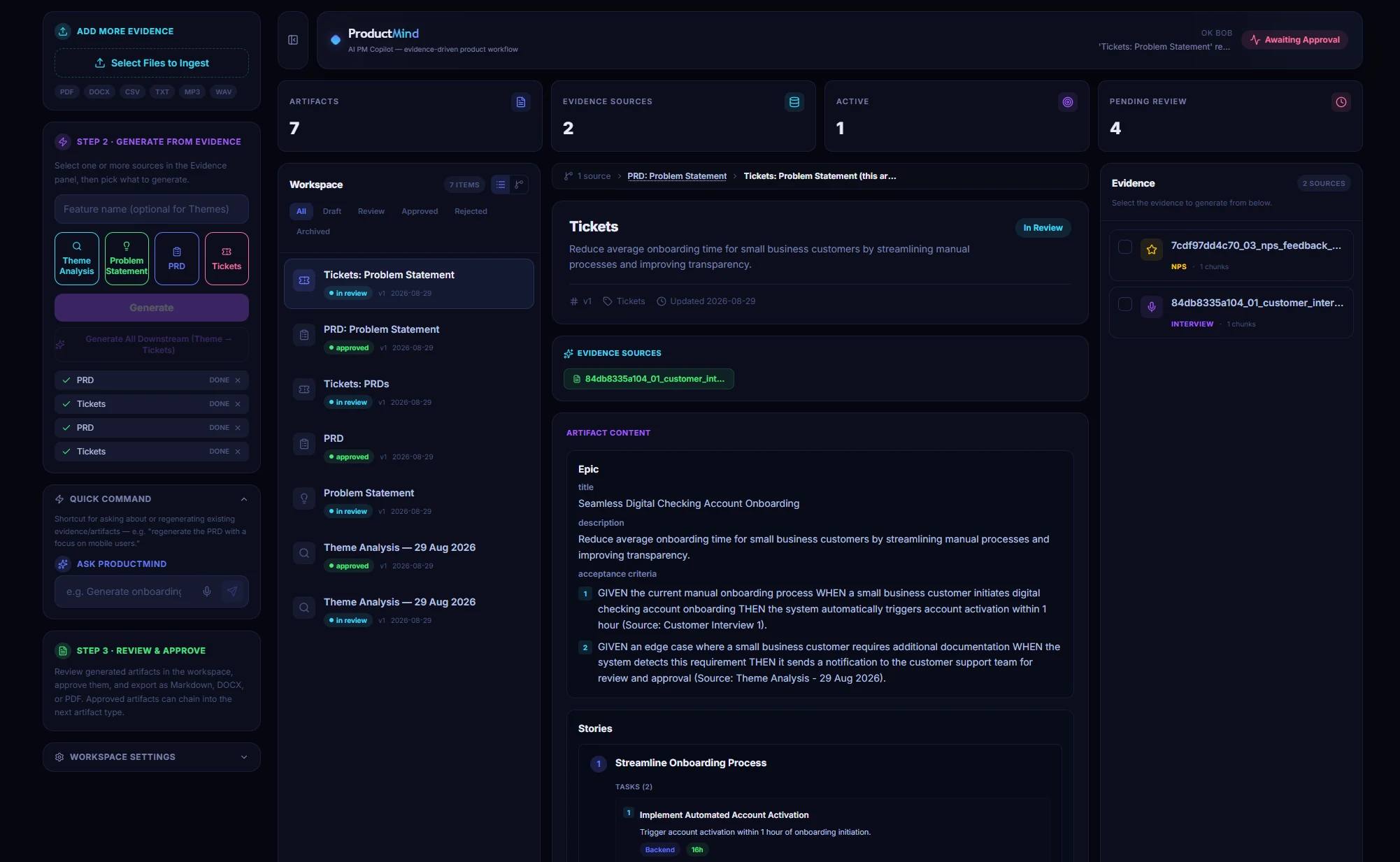
ProductMind V1 workspace showing an evidence sidebar, approved PRDs and engineering tickets with acceptance criteriaView full-size workspace

ProductMind V1 · evidence, PRDs and tickets in one workspace.

Recognised by

From customer interviews to PRD in seven steps

Every step is traceable, and you stay in charge.

1
Add your sources.
Upload files and transcripts.
2
Find the themes.
It reads everything together and groups what keeps coming up.
3
Frame the problem.
A clear problem statement, backed by evidence.
4
Write the PRD.
Objectives, scope, requirements and acceptance criteria.
5
You review and approve.
Edit, give feedback, regenerate.
6
Break it into tickets.
Engineering-ready tasks.
7
It learns your style.
Memory improves with every edit.
Example data · onboarding
Activation Drop Onboarding Confusion Empty State UX Permission Model Role-based Paths CSV Import Friction
Synthesised from 5 sources · 38 unique signal fragments · Evidence-grounded
PROBLEM STATEMENT
New users experience low activation (avg 46%) in their first 7 days, primarily due to an empty initial state, unclear permission model, and no role-differentiated onboarding path, resulting in elevated support load and poor week-1 retention across SMB and mid-market segments.
Backed by 12 support tickets + 3 customer interviews
Objective
Increase 7-day activation rate from 46% to 70% by shipping a guided onboarding experience with role-based paths and quick-win milestones.
Requirements (P0)
Setup checklist · Role selector · Guided first action · Empty state content · Progress persistence
Success Metrics
Day-1 activation ≥ 60% · Time to first action < 20 min · Support tickets in week 1 reduced by 50%
P0 Implement Role Selector in Setup Wizard
P0 Add Onboarding Progress Checklist Component
P1 Design Empty State with Guided CTAs
P1 Role-based Welcome Email Trigger

What it does

Built for product teams who can't paste customer data into ChatGPT.

Talk or type.

Say "Write a PRD for the onboarding redesign" or type it. ProductMind does the rest.
Example data
▸ COMMAND
Extract onboarding pain points from all uploaded files.

It learns how you write.

It picks up your preferred PRD structure, your team's vocabulary and your editing habits. Every revision makes the next draft closer to what you'd write yourself.
Example data
Prefers JTBD framing ACs in Given/When/Then 3-tier priority model Metric-first objectives Mobile-first scope Concise section headers

See why it said that.

Watch it work in real time. Every claim in a PRD links back to the customer quote it came from, so you can check it in one click.
Example data
▸ Classifying intent…
▸ Loading 5 source docs into context
▸ Running theme extraction model
▸ 6 themes identified · confidence 0.91
▸ Drafting problem statement…
▸ Artifact saved · ID: art_prd_008

Usage data in the loop.

Bring in activation and usage numbers so priorities come from what customers actually do, not gut feel.
Example data
Activation rate • last 10 weeks

Every version saved.

Compare drafts, restore an earlier one, and see exactly what the AI changed and why.
Example revision history
v3
Regenerated with mobile focus
2 min ago
v2
Manual edit: ACs updated
14 min ago
v1
Initial generation
31 min ago
Team and Enterprise · founding teams

Teach it your product.

Point ProductMind at your existing PRDs, roadmap, architecture docs and past decisions. It reads and indexes them, then uses them in every answer, with a link back to the source document. Add or remove documents any time. Everything stays on your servers.

Existing PRDsRoadmapArchitecturePast decisions

Why where your data lives matters

Regulated teams can't paste customer data into a cloud tool. So we don't ask you to.

Flat, predictable cost

  • No per-query charges
  • No surprise bills as your usage grows
  • You pay a plan price, plus hardware you own

Your data stays inside your boundary

  • No third-party processor handling your product data
  • Designed to help you meet GDPR and data-residency requirements
  • No copy of your customer data sitting in someone else's cloud

It gets better every sprint

  • Learns your style and your team's standards
  • On Team, new PMs inherit that knowledge on day one
  • The longer you use it, the more useful it gets

Pick where it runs

Solo

On your own device

Team

On your own servers or private cloud, with heavier models and shared knowledge

Enterprise

Inside your IT setup, with SSO and the integrations your security team requires

Model files download from external sources during setup. For support, share only what you choose. Read how product data is handled.

Simple pricing. No per-query fees.

ProductMind runs on your own hardware, so we never charge by usage. Pick a plan and you know what you'll pay.

Free Trial

$0for 14 days

Try the full Solo version on your own computer. No card needed.

Request free trial

Solo PM

$49/month

$490/year (2 months free)

For one PM who wants PRDs backed by real customer quotes.

  • One PM · your own device
  • Evidence-linked PRDs and tickets
  • Personal writing memory

You’ll need: a modern laptop or desktop with 32GB RAM. A GPU makes it faster.

Request Solo access

Enterprise

Custom

For larger teams running ProductMind inside their own IT setup.

  • 10+ seats · your own IT
  • SSO and integrations
  • Security and procurement support
Talk to us
Compare every plan featureFull inclusions, setup and support details

Free Trial

Solo PM

  • Interviews, tickets and NPS to PRD to dev tickets
  • Every requirement linked to its source quote
  • Learns your style with every edit
  • Voice and text commands
  • Full revision history and restore
  • Cancel anytime within 30 days of ordering

Team

  • Everything in Solo
  • One shared memory. It learns your team's standards once. New PMs get them on day one.
  • One evidence library. Upload once, and everyone cites the same quotes.
  • Teach it your product. Learns from your existing PRDs, roadmap and architecture docs.
  • Control. Roles, approval before tickets go out, and a full audit log.
  • Bigger models on a dedicated GPU server for better output on large datasets.
  • Priority support and upgrades
  • Extra seats: $60/month each

Setup includes: installation on your server, model tuning, data migration, team training and a security pack for your compliance team.

Enterprise

  • Everything in Team
  • SSO and identity management
  • Integrations that live inside your own environment
  • Security and procurement review support
  • Onboarding built for regulated industries

All prices exclude VAT. No per-query fees, ever. Your only extra cost is hardware you own. Prices shown in USD.

One PM or a shared team?

Solo is your personal workspace. Team adds one shared memory, evidence library and audit trail for up to 5 PMs. Five Solo plans do not create a shared team workspace.

Your questions, answered

What regulated product teams ask us most.

Product and workflow

What is ProductMind?

It's an AI Product Manager. You give it customer interviews, support tickets and NPS feedback. It gives you evidence-linked PRDs and dev tickets in minutes, and every requirement points back to a real customer quote.

How is this different from ChatGPT or Notion AI?

Those are great general tools, but they send your data to a cloud service, and many regulated companies don't allow that. ProductMind also traces every requirement to a source quote, remembers your style, and turns the PRD into tickets.

Can ProductMind learn from our own documents?

On Team and Enterprise, yes. Point it at your existing PRDs, roadmap and architecture docs. It indexes them and uses them in every answer, with citations back to the source. You can add or remove any document at any time.

Does it generate tickets automatically?

Yes. Once you approve a PRD, ProductMind breaks it into engineering tickets with acceptance criteria.

Deployment and hardware

Does my data really stay private?

On Solo, your interviews, PRDs and memory stay on your own device. On Team, they stay on your own servers or private cloud. On Enterprise, they stay inside your IT setup. In every case, we don't see your product data.

Does it work offline?

Once the models are downloaded, the AI itself runs without an internet connection.

Do I need a GPU?

For Solo, no, but one makes it faster. For Team, yes. Several PMs generating PRDs at once on bigger models needs proper GPU power.

What about ChatGPT Enterprise or Azure OpenAI in our own tenant?

If your company has approved one of those, it's a good general tool. ProductMind is built for the product workflow itself: evidence tracing, memory that improves over time, audit trail, and ticket breakdown, with nothing leaving your own boundary.

Plans and access

Why is there a setup fee for Team?

Team runs as a shared system on your servers, not as an app on one laptop. We install it, tune the models, move your data in and train your team. You pay for that once, then it's a flat monthly price.

What will the Team server cost me?

Roughly £6,000 to £12,000 one-off, depending on the model size you want, and you own it. A GPU VM in your own cloud turns that into a monthly cost instead.

Can I try Team before I commit?

Yes, through a 30-day paid pilot. If you stay, the setup fee is credited. You can also try Solo free first to see the output quality.

Explore every step, from upload to ticket

Five detailed examples · expand to explore

From raw customer signal to dev-ready ticket

Here's what happens between upload and shipped ticket.

01
Upload your raw signals.
Bring in interview notes, support ticket exports, NPS feedback, sales call transcripts and usage CSVs. The examples below use text, CSV, PDF and Markdown files.
TXTCSVPDFMarkdownType validation
01_customer_interviews_onboarding.txt
02_support_tickets_onboarding.csv
03_nps_feedback_onboarding.txt
04_sales_call_notes_onboarding.txt
05_usage_metrics_onboarding.csv
✓ 5 sources ingested · 247 chunks indexed
02
It finds and groups the themes.
The AI reads every source together, spots the pain points that keep coming up, and groups them into labelled themes. Each theme links to the exact fragments behind it, so you can audit the evidence.
RAG retrievalSemantic clusteringEvidence links
Activation drop
Onboarding UX
Empty state
Permission model
Role-based paths
Import friction
03
It writes the problem statement and PRD.
One command gives you a problem statement and a full PRD: objectives, scope, prioritised requirements, testable acceptance criteria and success metrics.
Structured outputAcceptance criteriaMetric-first
Problem
46% activation rate in week 1, driven by empty state and unclear setup flow.
Objective
Reach 70% day-7 activation with role-based guided onboarding and milestone tracking.
P0 Requirements
Setup checklist · Role selector · Progress persistence · Empty state CTAs
Success Metrics
Day-1 activation ≥ 60% · Time to first action < 20 min · Support tickets ↓ 50%
04
You review, edit and approve.
You own every document. Edit inline, or give feedback like "focus more on mobile" and regenerate. ProductMind learns from each revision. Approve the PRD and it flows straight into ticket generation.
Inline editingFeedback regenerationApproval gateMemory learning
PM Feedback
"Focus more on mobile onboarding and include success metrics per role."
✓ PRD Approved · v3
Chaining into ticket breakdown…
05

Teams: teach it your product.

Add your existing PRDs, roadmap and architecture docs. From then on, answers draw on your own history, with citations back to the source document.

Team and Enterprise · founding teams
Example data

Your product context

  • Existing PRDs
  • Product roadmap
  • Architecture docs

Answers linked back to your source documents.

Get access, or talk deployment

Trial and Solo access are arranged personally by email. For Team or Enterprise, tell us about your deployment. No download starts and no payment is taken through this form.

Choose an option below. We’ll reply by email with the next steps.

Sent to founders@productmind.uk. Please don’t include sensitive data. Privacy policy.

Inside ProductMind V1

Full-size ProductMind V1 workspace, including evidence sources, PRDs, approval states and engineering ticket acceptance criteria

Scroll to inspect the workspace. Press Escape or use Close preview to return.